GTA 6 is out now on PS5 and Xbox Series X|S. You save from the pause menu in free roam, and this guide covers how to save in GTA 6, the 15 slots, the hidden autosave, greyed-out buttons, and reload mistakes. The PC version has not launched, so these are console steps.
How to save in GTA 6: where the save option lives
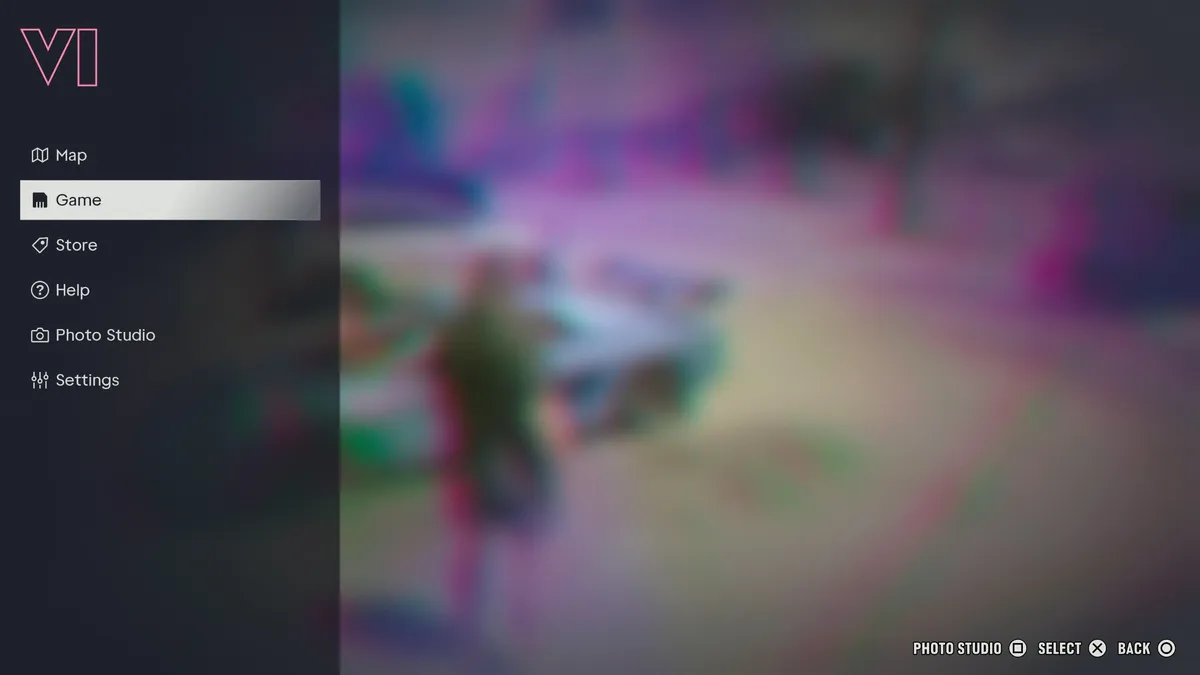
The direct answer to how to save in GTA 6 is the pause-menu route, not a bed or a special icon. Press Options on PS5 or Menu on Xbox, open the Game tab, choose Save Game, and pick one of the 15 slots. I would do this before every story job, because the option is quick and the slot list is clearer than a single autosave. To make a manual save in GTA 6, you can do it anywhere in free roam; you do not need a safehouse or bed.

GTA 6 does have a save-anywhere feature like Red Dead Redemption 2 in free roam, but it blocks saves in missions and the prologue. Saving in GTA 6 works through that same menu whether Jason or Lucia is active, so the main mistake is looking for a bed prompt instead of opening the GTA 6 controls and pause menu. The game launched on 19 November 2026 on PS5 and Xbox Series X|S, and the PC version has not launched, so I would not build a routine around a PC keybind yet.
How many save slots you actually get
Knowing how to save in GTA 6 is the easy part; the slot plan is what saves you. GTA 6 has 15 manual save slots and a hidden 16th slot reserved for autosave. With only 15 slots, you cannot branch into a fresh save every time you want to rewind, so I would use one slot per chapter and keep one spare for a clean pre-mission point. You can go back to an earlier save in GTA 6 after dying by loading a manual slot, but if you were relying on autosave, the hidden 16th slot may already have moved on.

- I would keep one slot per chapter, because 15 slots disappear fast once you start branching for alternate outcomes.
- I would hold a clean free-roam slot with no wanted level, so a bad reload does not cost you a mission setup.
- I would avoid overwriting the oldest chapter slot until the next chapter is stable, especially before a GTA 6 chapter finale.
When GTA 6 won't let you save
You cannot save during the prologue in GTA 6; saving unlocks after the prologue at Jason's marina house after his first job for Brian. You cannot save during a mission in GTA 6, so finish or fail the mission before opening the save menu. You also can't save in GTA 6 during most missions and while cheats are active; using cheats disables saving entirely until you quit out of the game.
The trap is treating the greyed-out option as a bug. If a mission is active, the prologue is running, or cheats are on, the save button is doing its job. I would back out to free roam, finish the call or job, or restart the session after cheats before worrying about a corrupted save.
How to save in GTA 6: what autosave covers and what it misses
GTA 6 is autosaving after every mission and after big open-world encounters such as being Wasted or arrested, and that goes into the hidden 16th slot. GTA 6 autosaves often enough that you can ignore it for normal play, but it is a single overwritten slot, not a history. The autosave covers mission completion, deaths and busts, but it misses the clean pre-mission checkpoint that manual saves give you, so I would still make a manual save before a big job.
The autosave also fires after big open-world encounters, so a random police chase can replace the state you wanted to keep. I would not quit after a chaotic free-roam fight without checking the manual slot list. If you need a specific loadout or vehicle for a GTA 6 mission, save before you start rather than trusting the hidden slot.
Beds, sleep and stashing cash at the safehouse
You do not have to sleep at a safehouse to save in GTA 6, and you can save outside of your house if you are not on a mission. Sleeping at Jason's first safehouse, his stilt house in Key Lento, skips the night and restores Health and Stamina, so I would use it for recovery, not as the only save step. The safehouse is a convenience, not a save requirement, and that is the part of save in gta 6 that beginners get wrong: a bed is comfort, not a checkpoint.
I would still visit the GTA 6 safehouses page before planning a long session, because beds are useful for skipping night and resetting your health, not for creating extra slots. Stashing cash is a separate safehouse job; do not confuse it with the pause-menu save. If a bed prompt appears, it is a comfort feature, not the save system.
No mission replay: planning your saves
You cannot replay missions in GTA 6, so manual saves are the only way back to an earlier mission. With 15 slots, I would keep a rolling pre-mission save before story jobs and never overwrite it until the next chapter is stable. Whether you can save Donnie in GTA 6 is a mission outcome detail this page does not settle, so check the Clean Up After Donnie mission page instead of guessing from the save screen.
The absence of mission replay changes the save plan more than anything else. If a mission goes badly and you want to try a different approach, load your pre-mission slot rather than hoping the autosave keeps the old state. I would name my slots mentally by chapter and job, because a list of 15 timestamps gets unreadable fast.
Fixing a greyed-out save button
The Save Game option is greyed out in GTA 6 when you are in the prologue, mid-mission, have cheats active, or have just finished a phone call or objective. If saving is greyed out in free roam, wait for the call or objective to clear, then open the pause menu again; I would not fast-travel or start another job until the option returns. That greyed-out button is the game telling you the world is still in a scripted state, not that your save is broken.
Start with the simplest check: are you actually in free roam? If not, finish or quit the mission. Next, check whether cheats are active, because cheats disable saving until you quit out of the game. I would also avoid saving during a phone call or a scripted objective, since the menu can stay locked until the line finishes.
Quitting and reloading without losing progress
To quit the game in GTA 6, make a manual save, then close the game from the PS5 or Xbox Series X|S dashboard; the PC version has not launched, so there is no PC quit flow to describe. GTA 6 reloaded you somewhere else and seemed to lose your stuff because loading a save can drop you near where you saved but at the nearest respawn point, so save again after the load and check your inventory. That is the last step in save in gta 6 I would check before quitting: a manual slot you can see, and a reload test if the load point looks wrong.
If the reload point looks wrong, do not overwrite your good slot immediately. Load once, check the map and inventory, then make a fresh save in a spare slot. The GTA 6 PC version is not out, so console dashboard quitting is the only route I can describe; do not invent a PC menu path.
This page is part of our GTA 6 release date, editions and platforms guide.
Sources for this page
Frequently asked questions
How does saving work in GTA 6?
Manual saving lives in the pause menu under Game, while a hidden 16th slot autosaves after missions, deaths and busts.
Why can't I save in GTA 6?
You can't save during the prologue, mid-mission, or while cheats are active, and a recent phone call can leave the option greyed out.
Can you save during a mission in GTA 6?
No, you cannot save while a mission is in progress, so finish or fail it first.
Do you have to sleep at a safehouse to save?
No, sleeping is for skipping night and restoring Health and Stamina, not for saving.
Can you replay missions in GTA 6?
No, GTA 6 has no mission replay, so manual saves are your only way back.
Does using cheats disable saving?
Yes, cheats disable saving entirely until you quit out of the game.
How often does GTA 6 autosave?
It autosaves after every mission and after big open-world encounters such as being Wasted or arrested.
Is autosave enough when I learn how to save in GTA 6?
No; autosave is a single hidden slot, so you still need manual saves for a clean rewind.